Your Best Travel eSIM Card for Stress-Free Roaming
Imagine landing in Tokyo and, within seconds, having full data access on your phone without swapping a SIM card. That’s the power of a travel eSIM—a digital, embedded SIM you buy and activate instantly online before or during your trip. It lets you bypass roaming fees entirely, switching between local or global data plans from your phone’s settings with zero physical hassle. This means you stay connected for navigation, translation, and sharing memories, starting the moment you step off the plane.
Why Physical SIM Cards Are Becoming Obsolete for Global Trips
You land in Bangkok, fumbling with a tiny SIM tray while juggling a suitcase, only to realize you’ve lost the ejector tool. Your data limps along on a local prepaid card that runs out midday, forcing you to hunt for another shop. With a travel eSIM, you purchase and activate a plan before you leave home, switching between profiles for Japan, then Italy, without ever touching a plastic card. No hunting for adapters, no sticky sim cards, no frantic top-ups in a foreign language. The moment you step off the plane already connected, the physical sim feels like a fragile relic you’re relieved to leave behind.
The Hidden Costs and Hassles of Roaming Charges Abroad
Roaming charges abroad sneak in through shockingly high per-MB rates for navigation or messaging, turning a quick email check into a bill shock. You face hidden daily connection fees even on so-called “free” roaming zones, with automatic updates consuming data without warning. Forgetting to disable background app refresh can drain your wallet faster than minutes of talk time. The hassle extends to unreliable local network partnerships, dropping calls mid-conversation or throttling speed to unusable levels.
- Billing errors from complex “bundled day passes” that don’t activate properly
- Surprise surcharges for tethering your laptop to your phone’s connection
- Lengthy customer support calls to dispute unexpected data overage fees
What Happens When You Arrive Without Local Connectivity
Arriving without local connectivity leaves you unable to access critical travel tools. You cannot load maps, confirm ride-sharing pickups, or authenticate into banking apps that require a one-time password via SMS. Hotel directions and digital boarding passes become inaccessible. Seeking free Wi-Fi in an unfamiliar terminal wastes time and exposes you to security risks. This arrival connectivity gap forces reliance on airport kiosks with inflated roaming rates or awkward physical SIM purchases while jet-lagged.
- Ride-sharing and taxi apps fail to load, forcing cash-only transactions and taxi queues.
- Hotel check-in details or locker codes stored in email remain unreadable without a data connection.
- Emergency contact numbers require manual lookup, which is impossible if stored digitally.
Understanding Digital SIM Technology for International Use
Understanding Digital SIM Technology for International Use begins with recognizing that a travel eSIM is a reprogrammable chip embedded in your device, eliminating the need for a physical plastic card. Instead of swapping SIMs at borders, you download a digital profile from a provider, which instantly connects you to local networks abroad. This technology works by storing multiple carrier profiles, allowing you to switch between a home plan and a travel eSIM for data in a new country without removing anything. Activation happens via a QR code or app, and the profile contains your authentication keys—no physical logistics required. For international use, this means you buy and install a plan before leaving, ensuring connectivity upon arrival without hunting for a store.
How Embedded Profiles Work on Modern Smartphones
An embedded SIM (eSIM) stores multiple profiles directly on a smartphone’s motherboard, eliminating the need for a physical card. When traveling, you download a travel eSIM profile—a secure data package containing carrier credentials—via a QR code or app. This profile installs into a dedicated eSIM management interface within your Singapore eSIM phone’s settings, where you can toggle between active lines for data or voice. Switching profiles typically requires only a few taps, not a physical swap, even mid-journey. Most modern flagship phones support multiple eSIM profiles concurrently, letting you keep your home line active while adding a local data plan.
Q: How do I manage multiple embedded profiles while traveling?
A: Open your phone’s cellular settings—you’ll see a list of installed eSIM profiles. Tap a profile to enable it as your primary data line, or label them (e.g., “Home” and “Japan Data”) for quick switching. Disabling a profile keeps it stored, so you can reactivate it later without re-downloading.
Key Differences Between a Virtual Card and a Traditional Chip
The primary difference between a virtual card and a traditional physical SIM chip lies in how they connect to a network. With a traditional chip, you must insert a plastic card into your device, limiting you to a single carrier. A virtual card, or eSIM, is embedded directly into the phone’s hardware and can be activated remotely by scanning a QR code or installing a profile. This eliminates the need to swap physical cards when traveling. Switching between carriers is instant with a virtual card, whereas a traditional chip requires physically changing the card. Additionally, a virtual card allows you to store multiple profiles, enabling you to keep your home number active alongside a local travel plan, something a single traditional chip cannot support without dual-SIM hardware.
| Aspect | Virtual Card (eSIM) | Traditional Chip (Physical SIM) |
|---|---|---|
| Physical Form | Embedded software, no physical card | Plastic card with a metallic chip |
| Activation | Remote via QR code or app | Manual insertion into a slot |
| Switching Carriers | Instant digital profile change | Requires removing and inserting a new card |
| Multi-Profile Use | Supports several stored profiles | Typically only one active at a time |
Device Compatibility: Which Phones Support eSIM Features
For travelers, eSIM-compatible phones are a game-changer, but not every device unlocks this feature. Most recent flagship models from Apple (iPhone XS and newer, including SE models) support eSIM, as do Google Pixel phones from the Pixel 3 onward. Samsung users should look for the Galaxy S20 series, all newer Z Fold and Flip devices, and most A-series models from 2020. Mid-range and older devices often lack native eSIM hardware, so always check your phone’s settings under “Cellular” or “Connections” for “Add eSIM” before traveling.
Only recent flagship and select mid-range phones from Apple, Google, and Samsung support eSIM; always verify your device model’s compatibility before purchasing a travel plan.
Selecting the Best Data Plan for Your Journey
When selecting the best data plan for your journey, prioritize a travel eSIM that matches your itinerary’s duration and data intensity. For a 2-week trip with light navigation and messaging, a 3-5 GB regional plan is often sufficient, but heavy streamers should seek 10 GB or unlimited options. Consider multi-country plans to avoid per-country recharges if crossing borders. Avoid short-term “daily” plans for stays over a week, as they usually cost more than a single, longer package. Q: Should I choose a regional or global travel eSIM? A: Choose regional for single-continent trips to save money; global plans are only cost-effective for multi-continent journeys.
Comparing Regional Packages vs. Global Coverage Options
When selecting a travel eSIM, comparing regional packages versus global coverage options hinges on your itinerary. A regional package (e.g., Europe or Asia bundle) offers cost-effective data pools for multi-country trips within a specific zone, often at lower per-gigabyte rates than global plans. Conversely, a global coverage option provides seamless access across continents, ideal for erratic routes or layered destinations spanning multiple regions. Regional packages may exclude outlier countries like Turkey or Israel, while global plans often have slower speeds on shared networks. Assess your route: if confined to one region, a regional package maximizes value; if venturing across zones, global coverage avoids purchasing multiple separate eSIMs mid-journey.
Regional packages save money for contained multi-country trips; global coverage offers simplicity for unpredictable, cross-continental travel.
Data Caps, Speeds, and Fair Usage Policies Explained
A travel eSIM’s fine print hinges on data caps, speeds, and fair usage policies. A “10GB plan” often means a hard cap—once you hit it, data stops dead; no overage fees, just top-ups. Speeds are usually throttled after a daily soft cap (e.g., 500MB at 4G, then 2G). Fair usage policies prevent abusive streaming; violate them, and your speed may be permanently reduced until the next cycle. Always check if the cap is per day or total trip to avoid surprises.
| Aspect | Hard Cap Plan | Soft Cap Plan |
|---|---|---|
| Data Cap | 4GB total, cuts off at limit | 1GB daily, then throttled |
| Speeds | Full 4G until cap | 4G then 2G after soft cap |
| Fair Usage Policy | N/A—hard stop | Limits video streaming |

Budget-Friendly Choices for Short Stays or Extended Travels
For short weekend trips, a small 1GB eSIM plan costing a few dollars beats buying a physical SIM. Budget-friendly travel eSIM providers like Airalo or Holafly offer regional packs that slash costs. “How can I avoid wasting money on a huge data block?” Pick a 1GB-3GB plan for a week; you can always top up if needed. Consider a regional plan for multi-country trips over multiple single-country ones to stretch your budget further. For longer travels, monthly rolling plans with 5GB-10GB often undercut daily passes, keeping costs predictable without sacrificing connectivity.
Activation and Setup Without the Headache
The core appeal of a travel eSIM is the elimination of physical SIM swapping and retail store visits. Activation and Setup Without the Headache means scanning a QR code sent to your email before you depart, which installs the profile in under two minutes. You then simply toggle the line on upon arrival, avoiding roaming activation nightmares or airport kiosk queues. The key insight is that the eSIM remains dormant until you connect to a local network, so you can set it up entirely from your home Wi-Fi.
This pre-departure installation ensures you are live the moment your plane lands, turning a logistical chore into a seamless, zero-stress transition.
After the initial scan, no further configuration is required; your phone switches automatically between your home and travel lines for calls and data.
How to Purchase and Install Before Departure
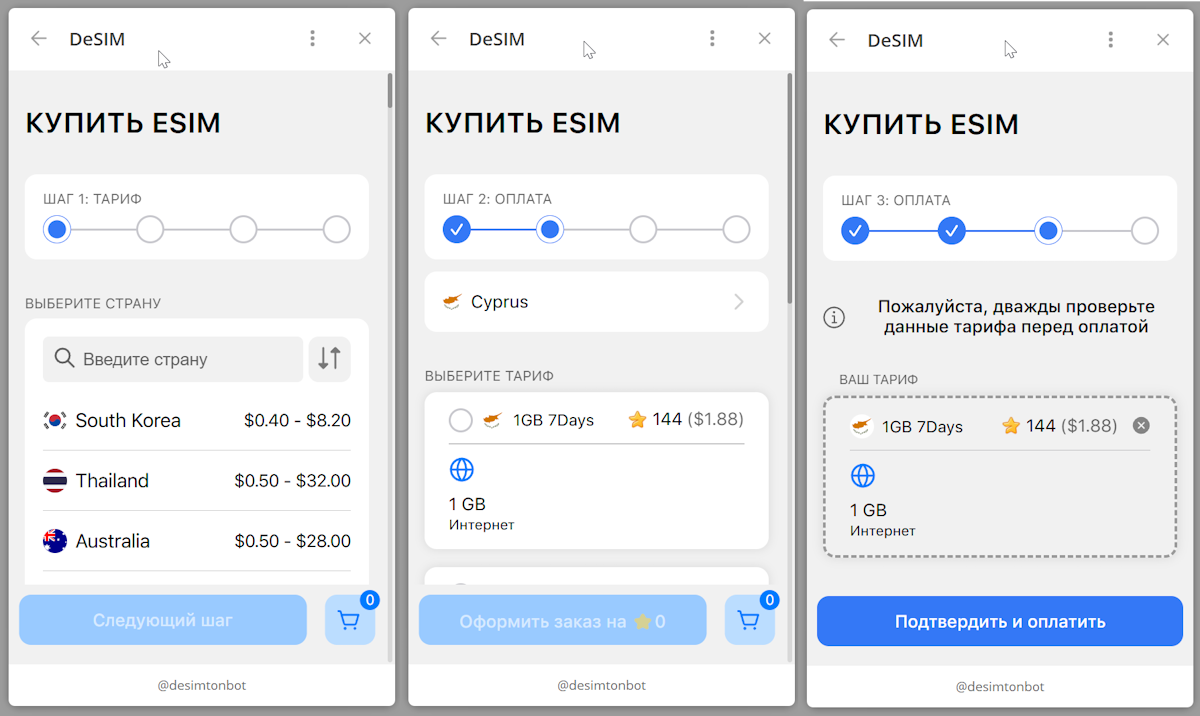
Purchase your travel eSIM directly from the provider’s app or website using a credit card, selecting a data plan that matches your destination and trip length. Install it by scanning the QR code sent via email or by manually entering the activation details in your phone’s cellular settings. Complete this process before departure from home while you have Wi-Fi, ensuring the eSIM activates on the specified start date. Your device will then connect automatically upon arrival abroad, eliminating roaming paperwork and physical SIM swaps.
Buy and install your travel eSIM at home over Wi-Fi, and it will activate automatically when you land, so you’re connected the moment you step off the plane.
Step-by-Step Guide to Scanning a QR Code or Downloading a Profile
To activate your travel eSIM, begin by confirming your device is unlocked and connected to Wi-Fi. Open your email or the provider’s app to locate the QR code sent after purchase. Navigate to your phone’s settings, select “Cellular” or “Mobile Data,” and choose “Add eSIM.” Scan the on-screen QR code directly with your camera. If the QR fails, manually enter the provided SM-DP+ address and activation code. After scanning, label your new plan (e.g., “Japan Trip”). Tap “Continue” and ensure **data roaming is enabled** for immediate connection. You are now set for travel connectivity.
| Step | QR Code Method | Manual Download Method |
|---|---|---|
| 1 | Open camera and scan QR from email | Open phone settings for eSIM |
| 2 | Tap notification to install profile | Enter SM-DP+ address and code |
| 3 | Confirm installation prompt | Download and confirm profile |
Troubleshooting Common Connection Issues on Arrival
If your eSIM fails to connect upon arrival, first force a network search in your device settings and select the eSIM’s designated carrier manually. An incorrect APN is a common culprit: verify it matches your provider’s exact configuration, often “iot” or “global”. Toggle Airplane Mode for 10 seconds to refresh the connection. If still offline, ensure data roaming is enabled for that specific eSIM line—not your primary SIM. Q: What if my eSIM shows “No Service”? A: Restart your phone; if unresolved, reinstall the eSIM profile from your confirmation email, as the initial activation may have failed due to timing gaps between time zones.
Maximizing Signal Strength Across Borders

Maximizing signal strength across borders hinges on your travel eSIM’s ability to latch onto the strongest local carrier in real time, not just your home network’s roaming partner. Prioritize a multi-network travel eSIM that automatically scans and switches between local towers—this eliminates dead zones by bypassing congested or weak single-network agreements. Position your device near a window or higher ground when crossing borders, as signal handoffs between countries often drop in transit tunnels or valleys. Yet even the most robust eSIM can falter if your phone’s radio band doesn’t match the local frequency, so confirm your device supports the region’s LTE/5G bands before departure. Disable automatic carrier selection once connected to stabilize the link.
Staying Connected When Crossing From One Country to Another
Crossing a border with a travel eSIM requires understanding automatic network switching. As your device loses signal from the previous country, it will scan for available partner networks, often creating a brief drop of 30–90 seconds. Manually selecting a new network can accelerate this process if auto-connection lags. Seamless cross-border connectivity relies on a multi-country eSIM plan covering both nations, preventing roaming charges or manual profile swaps. Ensure data roaming is enabled in settings before departure, and verify that the eSIM’s coverage map includes the exact border regions, as some plans deactivate immediately at the borderline rather than within a gradual zone.
Tips for Switching Between Local and International Networks
For seamless connectivity, manual network selection is crucial when switching between local and international profiles. Disable automatic roaming in your device settings, then scan and lock onto a local carrier manually to avoid unreliable foreign networks. When crossing borders, force a re-scan by toggling airplane mode for 10 seconds. Pre-load your eSIM profiles before departure to prevent activation delays at checkpoints. Keep your primary eSIM disabled except for emergency calls, and assign data routing exclusively to the local network via dual-SIM settings.
Switch networks manually by disabling auto-roaming, scanning for local carriers at borders, and toggling airplane mode to refresh connections.
Managing Multiple Profiles for Frequent Flyers
For frequent flyers, managing multiple eSIM profiles prevents service gaps during rapid border crossings. The primary advantage lies in automated profile switching, allowing one profile for a primary home carrier and separate profiles for regional providers, avoiding manual reactivation each time. Prioritizing a primary profile alongside temporary local ones ensures seamless fallback if airport network congestion occurs. This structure requires pre-loading destination-specific plans before departure, then using the device’s SIM manager to designate which profile handles data, calls, and SMS. Effective organization hinges on labeling each profile by region or validity period, preventing confusion when toggling between active ones mid-trip.
Saving Money While Roaming With a Digital Alternative
To maximize saving money while roaming with a digital alternative, a travel eSIM is your most direct tool. Unlike physical SIMs that incur daily carrier surcharges, a travel eSIM lets you pre-purchase affordable local or regional data packages before departure. You avoid per-megabyte fees and surprise bills by selecting a plan that matches your exact usage, often costing a fraction of traditional roaming. Download a regional or global eSIM bundle for multiple countries to sidestep per-country activation fees. Manage your plan instantly via a companion app, disabling auto-renewal to prevent waste. Always compare eSIM providers by price per gigabyte for your specific destination, not by flashy marketing, ensuring you only pay for the data you actually need while keeping your primary line offline.
Cost Comparisons: Virtual Data vs. Standard International Add-Ons

When comparing costs, standard international add-ons from your home carrier often charge per megabyte or a flat daily fee, which quickly drains your budget. A virtual eSIM data plan, by contrast, offers prepaid, fixed-rate data. For example, a 7-day plan with 5GB might cost $12, while a carrier’s equivalent add-on could exceed $50 for far less data. This makes eSIM cost savings undeniable for any traveler.
| Cost Factor | Standard International Add-On | Virtual eSIM Data |
|---|---|---|
| Per-GB Price | $15–$25+ per GB | $2–$6 per GB |
| Daily Cap | Often limited (e.g., 500MB/day) | No daily throttle; full plan data |
| Overage Fees | High, per-MB charges | None; plan expires when data ends |
Avoiding Hidden Fees With Transparent Pricing Models
Transparent pricing models in travel eSIMs eliminate surprise charges by displaying the exact cost per megabyte or data package upfront. Avoiding hidden fees requires selecting providers that clearly state whether throttling, zero-rating, or speed caps apply after data exhaustion. Unlike traditional roaming, where charges often appear weeks later, digital alternatives itemize every deduction in real time. This granular visibility allows you to compare per-gigabyte rates across plans before committing. To stay safe, always verify the included coverage zones and any activation fees—terms that obscure total cost—before purchase.
Using Wi-Fi Hotspots and Dual-SIM Modes Strategically
By strategically combining Wi-Fi hotspots with dual-SIM modes, you can slash roaming data costs. Use your eSIM for critical connectivity when away from free Wi-Fi, but toggle your device to prioritize trusted hotel or café networks for heavy downloads. Meanwhile, configure your primary SIM for voice only, disabling its data to avoid accidental roaming charges. This back-and-forth allocation ensures you never pay for cellular data when a reliable Wi-Fi signal is available, while always keeping your main number reachable. Simply disable Wi-Fi calling on the primary line to prevent conflicts, and watch your eSIM data quota stretch significantly further.
Securing Your Data on Public Networks Abroad
When using a travel eSIM to save on roaming, you still need a strategy for public Wi-Fi security abroad. An eSIM itself encrypts the cellular connection, but public networks remain a vector for attacks. Always activate a VPN on your device before connecting to any hotel or café Wi-Fi, ensuring all eSIM traffic is tunneled. Disable automatic network joining to prevent your phone from connecting to fake hotspots that mimic legitimate foreign networks. Furthermore, use the eSIM’s data for sensitive logins instead of the public network.
What to Do if Your Virtual Profile Malfunctions Far From Home
If your eSIM profile malfunctions abroad, first toggle Airplane Mode for 60 seconds to force a network re-registration. Check that the profile’s APN settings match your provider’s instructions. Re-scan the original QR code or re-enter the activation code from your purchase email—these are usually saved in your account. If connectivity fails, manually select a different roaming partner network in your device’s carrier settings. Carry a screenshot of your eSIM’s activation code as an offline backup. As a last resort, buy a local physical SIM as a fallback until the digital profile is repaired.
In short: reset network, verify APN, reinstall profile, manually switch carriers, or use a physical SIM backup.
Backup Connectivity Options for Remote Destinations
When exploring off-grid areas, a primary travel eSIM can fail due to absent local partnerships or weak cell towers. Your emergency eSIM plan for remote destinations acts as a safety net, tapping into an alternative, often satellite-backed network. Search specifically for providers offering “global backup” top-ups that prioritize connectivity over speed. Keep this second eSIM profile dormant on your device until needed, activating it only when your primary signal drops. This avoids paying daily roaming fees for coverage you rarely use while ensuring you can still send an SOS or check maps from a mountain trail or remote island.
Future Trends in Mobile Data for Global Explorers
Future trends in mobile data for global explorers will see travel eSIMs evolve into fully autonomous connectivity managers. Your device will dynamically switch between local networks to optimize speed and latency without manual intervention, even across remote regions. AI-driven data plans will predict your usage patterns, pre-loading high-bandwidth maps or language packs before you lose signal. Expect passive income integrations where your unused data rolls over into a digital wallet for next trip. An eSIM could one day reserve satellite connectivity in real-time, not as a backup, but as a seamless extension of the network—ensuring you are never offline in an emergency.
Emerging Technologies That Could Replace Current System
Future global explorers may see eSIMs supplanted by satellite-based direct-to-device connectivity, bypassing local carrier infrastructure entirely. Instead of swapping profiles, your phone could lock onto low-earth orbit satellites for seamless data anywhere. Another candidate is software-defined radio chips that dynamically aggregate available spectrum—from Wi-Fi, 5G, or TV white spaces—into a single signal, eliminating roaming agreements. Mesh networking over short-range protocols like Li-Fi or 6G sidelinks could let travelers relay data through nearby devices, creating ad-hoc local coverage without any SIM or subscription.
Emerging technologies replace eSIMs with satellite direct connectivity, spectrum-agile radios, and device mesh relays for truly carrier-independent data access.
How Airlines and Hotels Are Integrating Seamless Connectivity
Airlines now bake eSIM activation directly into their booking flow, letting you purchase a data plan alongside your ticket and land connected. Hotels are following suit, offering QR codes at check-in that instantly download a local eSIM profile, bypassing clunky Wi-Fi logins. Some chains even pre-load your room’s smart TV with the same mobile data, so your streaming picks up where your phone left off. This integration means instant onboarding upon arrival—no SIM swaps or password hunts. Your connection stays fluid from the boarding gate to the hotel lobby.
Predictions for Affordable, Universal Coverage in the Next Decade
Within a decade, travel eSIMs will likely enable near-universal coverage through dynamically priced, hyper-local carrier bundles. This means a single eSIM profile could seamlessly switch between regional towers, eliminating roaming markups. Users will pay a flat subscription for a guaranteed baseline speed, with optional micro-payments for predictive data top-ups needed in remote zones. The technology will automatically prioritize the cheapest local infrastructure, making global connectivity as affordable as domestic plans.
- Automatic fallback to free public Wi-Fi when cellular costs exceed a user-set threshold.
- Split billing: a fixed low-rate for essential messaging plus variable cost for high-bandwidth streaming.
- Device-native negotiation: your phone will compare eSIM providers in real-time and switch profiles to maintain the lowest per-GB rate.
What Exactly Is a Travel eSIM and How Does It Keep You Connected Abroad?
The core difference between a physical SIM and a digital roaming profile
Which devices and smartphones support this embedded SIM technology for travelers
Understanding how your phone switches to local networks without swapping cards
Top Reasons Why Travelers Ditch Physical SIM Cards and Roaming Plans for This Digital Solution
Instant activation and no more hunting for a local vendor at the airport
Keeping your home number active while using a second line for foreign data
Comparing the cost savings against traditional international roaming add-ons
How to Choose the Right Travel eSIM Provider and Data Plan for Your Trip
Evaluating data allowances: what you genuinely need for maps, messaging, and streaming
Regional vs. global packages: picking a single-country card or a multi-country passport plan
Checking coverage map accuracy and confirming network speeds in your destination